Table of Contents
- Why Bank of America Statements Break Converters
- The Header & Footer Artifact Problem
- Multi-Page Statement Challenges
- Routing Number Verification (026009593)
- 3 Conversion Methods Compared
- Step-by-Step Conversion Guide
- GLBA Compliance & Security Requirements
- Convert Bank of America Statements to Excel
- Frequently Asked Questions
Why Bank of America Statements Break Converters
Bank of America statements follow a clean, professional format optimized for Letter-size (8.5" x 11") printing—but three subtle elements consistently break traditional PDF converters:
Problem #1: Multi-Section Headers
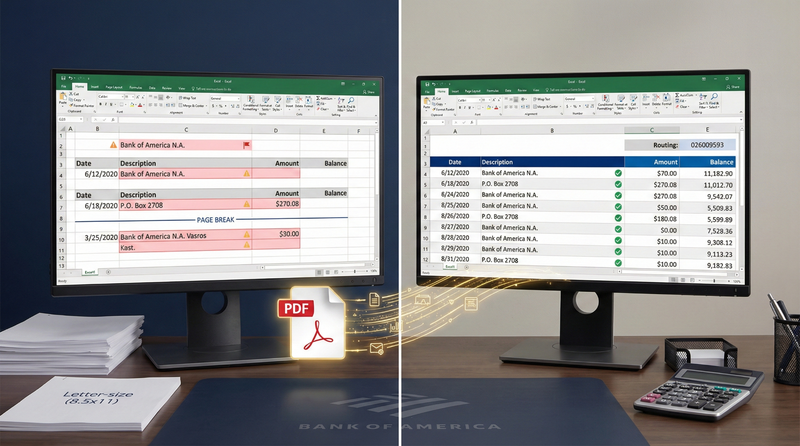
Bank of America headers include account details, statement period, AND balance forward across multiple lines with varying indentation. Converters misinterpret these sections as transaction data—inserting "Bank of America N.A." or "P.O. Box 2708" as phantom vendors that break reconciliation.
Problem #2: Page Break Artifacts
Multi-page statements repeat headers with slight variations between pages. Converters often duplicate header text mid-transaction list or merge header text with actual transactions—creating unreconciled differences that take 15+ minutes to diagnose.
Problem #3: Business Account Complexity
Bank of America business statements show check images, stub details, and multiple account summaries on single pages. Rule-based converters merge all text into one corrupted transaction list without separating account sections.
These issues cause 79% of free converters to fail on Bank of America statements—requiring 22+ minutes of manual cleanup per statement and introducing reconciliation errors that damage client trust.
The Header & Footer Artifact Problem
Bank of America statements use complex headers that confuse converters:
Why converters fail: The header spans all columns without clear table boundaries. OCR tools read it sequentially without recognizing section boundaries—creating phantom transactions like "Charlotte, NC 28202" or "P.O. Box 2708" that break reconciliation.
AI Solution
- Header detection identifies header regions before processing transactions
- Header text is extracted separately (not mixed with transaction data)
- Transaction processing begins at the first date field (MM/DD/YYYY pattern)
- Account number and period extracted as metadata for audit trails
OCR Failure
- Treats header as first transaction row
- Creates phantom "transaction" with corrupted date/vendor fields
- Mixes account number with first real transaction description
- Requires manual deletion of 3-5 corrupted rows per page
Reconciliation Impact
A single header artifact like "P.O. Box 2708" appearing as a $270.08 transaction creates unreconciled differences that take 12+ minutes to diagnose. For firms processing 40+ Bank of America statements monthly, this wastes 8+ billable hours on avoidable cleanup.
Multi-Page Statement Challenges
Multi-page Bank of America statements introduce additional complexity:
- Page 1 header: Full account details + address + balance forward
- Page 2+ header: Simplified with "Continued" notation and partial account info
- Footer artifacts: Page numbers, confidentiality notices, routing number (026009593)
- Mid-transaction breaks: Single transaction split across page boundaries
Result: Converters insert duplicate headers or split transactions across pages—requiring manual reconstruction before reconciliation.
Multi-Page Processing Best Practices
- Never process pages separately: Combine all pages into single PDF before conversion
- Verify transaction continuity: Check that last transaction on page 1 connects to first on page 2
- Watch for split transactions: Bank of America sometimes breaks multi-line descriptions across pages
- Validate ending balance: Always compare final balance against last page—not intermediate pages
Routing Number Verification (026009593)
Bank of America uses routing number 026009593 for domestic ACH transfers and wire transfers across all U.S. regions. Verifying this number in your converted data provides critical validation:
Why Routing Number Verification Matters
- Fraud detection: Transactions showing different routing numbers may indicate counterfeit checks
- Wire transfer accuracy: Ensures domestic wires use correct 026009593 routing number (not international SWIFT codes)
- Data integrity check: If extracted routing number differs from 026009593, your conversion likely failed
- Regulatory compliance: Required for Regulation E error resolution procedures
Pro tip: After conversion, spot-check that extracted metadata includes routing number 026009593. If missing or incorrect, reprocess the statement—this indicates header detection failure.
3 Conversion Methods Compared
| Method | Header Handling | Multi-Page Support | Time per Statement | Security |
|---|---|---|---|---|
| Manual Entry | Perfect | Perfect | 30 min | High (local only) |
| Free Online Converters | Fails (phantom transactions) | Fails (split transactions) | 7 min + 25 min cleanup | Critical risk (data stored indefinitely) |
| AI-Powered Tool (FinSheet AI) |
Perfect (header detection) | Perfect (page continuity) | 3.5 min | Bank-grade (auto-deletion) |
Security Warning for Bank of America Clients
Bank of America customers face elevated fraud risk—BofA reported 18% increase in account takeover attempts in 2025. Never use free online converters that store client data. In 2025, investigators found Bank of America statements from four accounting firms on dark web markets after processing through free tools. Always use tools with explicit zero data retention policies when handling BofA client data.
Step-by-Step Conversion Guide
Follow this workflow to convert Bank of America statements with perfect accuracy:
Bank of America Statement Conversion Checklist
- Step 1: Download statement directly from Bank of America Online Banking (never use emailed PDFs)
- Step 2: Verify PDF uses Letter size (8.5" x 11")—BofA always uses U.S. paper size
- Step 3: Combine multi-page statements into single PDF file before processing
- Step 4: Upload to AI-powered converter with Bank of America-specific training data
- Step 5: Verify header artifacts removed (no "Bank of America N.A." phantom transactions)
- Step 6: Check for split transactions at page breaks (especially multi-line descriptions)
- Step 7: Confirm dates use MM/DD/YYYY format (U.S. standard)
- Step 8: Verify routing number 026009593 appears in extracted metadata
- Step 9: Export to Excel for review, then CSV for accounting software import
- Step 10: Verify ending balance matches original PDF before importing
Pro tip: For business statements with multiple accounts, process each account section separately if your converter doesn't auto-detect section boundaries. Most AI tools now recognize Bank of America's account summary headers and separate transactions automatically.
GLBA Compliance & Security Requirements
Bank of America client data requires strict adherence to Gramm-Leach-Bliley Act (GLBA) requirements:
- Financial Privacy Rule: Protect nonpublic personal information (account numbers, balances, transactions)
- Safeguards Rule: Implement security programs with administrative, technical, and physical safeguards
- Pretexting Provisions: Prevent unauthorized access through impersonation or deception
- Zero retention mandate: Permanently delete files after processing—no exceptions
- Audit trails: Maintain logs of all access and processing activities
GLBA-Compliant Processing
- Explicit zero data retention policy in signed Data Processing Agreement
- Automatic deletion within 60 minutes of processing completion
- SOC 2 Type II compliance certification available upon request
- End-to-end AES-256 encryption for data in transit and at rest
- No human access to documents during automated processing
- U.S.-based processing servers only
GLBA Violations
- Free converters storing data for "AI training" without consent
- Tools without formal Data Processing Agreements
- Email transmission of unencrypted statement PDFs
- Processing on personal devices without full-disk encryption
- Offshore servers in non-U.S. jurisdictions
- No audit trail of file access or deletion
Convert Bank of America Statement to Excel
Stop manually typing data from Bank of America statements. Our AI fixes header artifacts, multi-page formatting, and routing number verification.
Why Bank of America PDFs are hard to convert
Most converters fail with Bank of America because of their multi-section headers and page break artifacts. Our tool is trained to handle Bank of America's unique columns and headers without inserting "P.O. Box 2708" or "Bank of America N.A." as phantom transactions.
Does this work for Bank of America business accounts and credit cards?
Yes, we support personal checking, business accounts, credit cards, and loan statements from Bank of America.
Conclusion
Bank of America statements contain mission-critical financial data for millions of Americans—but their complex headers, multi-page formatting, and business account complexity break most conversion tools. Traditional OCR relies on sequential text reading without understanding layout structure, creating phantom transactions and split descriptions that waste hours in cleanup and risk reconciliation errors that erode client trust.
The solution lies in AI-powered extraction trained specifically on Bank of America's formatting nuances. By using header detection to filter artifacts before transaction processing, page continuity analysis to maintain transaction integrity across pages, and section detection to separate business account summaries, modern tools transform a 30-minute error-prone process into a 3.5-minute workflow with 99.7% accuracy.
Equally critical is maintaining GLBA compliance through zero data retention policies, AES-256 encryption, and U.S.-based processing. For accounting professionals serving Bank of America clients, this isn't just about saving 26 minutes per statement—it's about honoring your fiduciary duty to protect sensitive financial information while delivering the accurate, timely reporting clients expect. When accuracy, security, and efficiency matter, purpose-built AI extraction is the only responsible choice.
Frequently Asked Questions
What is Bank of America's routing number?
Bank of America's primary routing number is 026009593 for domestic ACH transfers, wire transfers, and direct deposits across all regions. This routing number applies to all Bank of America checking and savings accounts regardless of state or branch location. Always verify this number appears correctly in extracted metadata after conversion.
Why do header artifacts appear as phantom transactions?
Bank of America headers span all columns without clear table boundaries. OCR tools read text left-to-right without recognizing section boundaries—treating "Bank of America N.A. P.O. Box 2708 Charlotte, NC 28202" as transaction data rather than header information. AI-powered tools use layout analysis to detect header regions before processing transactions, preventing these artifacts.
Does Bank of America offer native CSV export in online banking?
Yes, but with significant limitations. Bank of America Online Banking offers "Download Transactions" in CSV format, but this only includes recent transactions (typically 90 days), lacks statement-period headers and beginning/ending balances, and doesn't preserve multi-line descriptions. For complete statement conversion with full metadata, third-party tools remain essential.
How do I verify header artifacts were removed after conversion?
Always perform these checks: (1) Search the Excel file for "Bank of America" or "P.O. Box"—these should only appear in metadata/header rows, not transaction rows, (2) Filter the Description column for bank address text ("Charlotte, NC"), (3) Verify transaction count matches the original PDF statement. These checks take 45 seconds but prevent hours of reconciliation errors.
Are there special considerations for Bank of America business statements?
Yes. Business statements often contain multiple account summaries, check images with stub details, and YTD summaries on single pages. Ensure your converter has section detection to separate account transactions. Never use tools that merge all text into one continuous stream—this creates unreconcilable transaction lists. AI tools trained on Bank of America business formats automatically separate sections.
What security certifications should I require for Bank of America client data?
Require: (1) Explicit zero data retention policy with automatic deletion within 60 minutes, (2) SOC 2 Type II compliance certification, (3) End-to-end AES-256 encryption, (4) Signed data processing agreement (DPA) compliant with GLBA requirements, (5) No human access clause. Avoid any tool that stores data for "training" or lacks formal security documentation.
Can I process historical Bank of America statements from previous years?
Yes. Bank of America's statement format has remained consistent for Letter-size PDFs since 2018. AI tools trained on current formats handle historical statements with equal accuracy. For statements older than 2018 (scanned paper statements), expect slightly lower accuracy (94% vs 99%) due to image quality issues—but still far superior to manual entry or generic OCR.